 Adobe
Adobe  Sitecore
  Gradial
  PEGA
PEGA AI workflow automation in regulated industries: where to automate and where a human stays
Oct 06, 2026 | 6 min read
TL;DR: AI workflow automation works in regulated industries when a team decides in advance where a person stays in the loop. Automate the steps that follow rules and repeat at volume, and keep people on the calls that carry accountability. In McKinsey's 2026 AI trust survey, nearly two-thirds of respondents named security and risk concerns as the main barrier to fully scaling agentic AI.
Time any regulated workflow from start to finish, and you'll often find the same pattern. The hands-on work takes a few hours. The workflow takes days. The difference is waiting: for a document, a lookup, a signature.
AI workflow automation goes after the waiting. It reads the document and drafts the response while the request sits in the queue. It shouldn't go after the signature. In a regulated company, the signature carries accountability, and accountability stays with a person.
This post draws that line. It shows which steps to automate and where a person stays in the loop. Then it shows how to pick a first workflow. It builds on the four-phase sequence in our enterprise AI implementation roadmap.
What is AI workflow automation, and how does it differ from rule-based automation?
AI workflow automation uses AI to run business processes that have many steps. Some of those steps read documents, sort requests, or draft replies. Rule-based automation follows fixed if-then logic and breaks when an input looks different than expected. AI workflow automation handles that variation, such as a request written in free text or a scanned form.
That flexibility comes with a tradeoff. A rule-based script fails loudly when it hits something unfamiliar. An AI model can fail quietly, with an answer that reads well and is wrong. McKinsey's 2026 AI trust survey found that 74% of respondents identify inaccuracy as a highly relevant risk. (McKinsey, March 2026) Quiet failures are the reason to design review steps before launch.
Agents add one more layer, because they take actions across systems instead of only producing text. If you need the basics first, start with our guide to AI agents for business.
Which steps in a regulated workflow should AI automate?
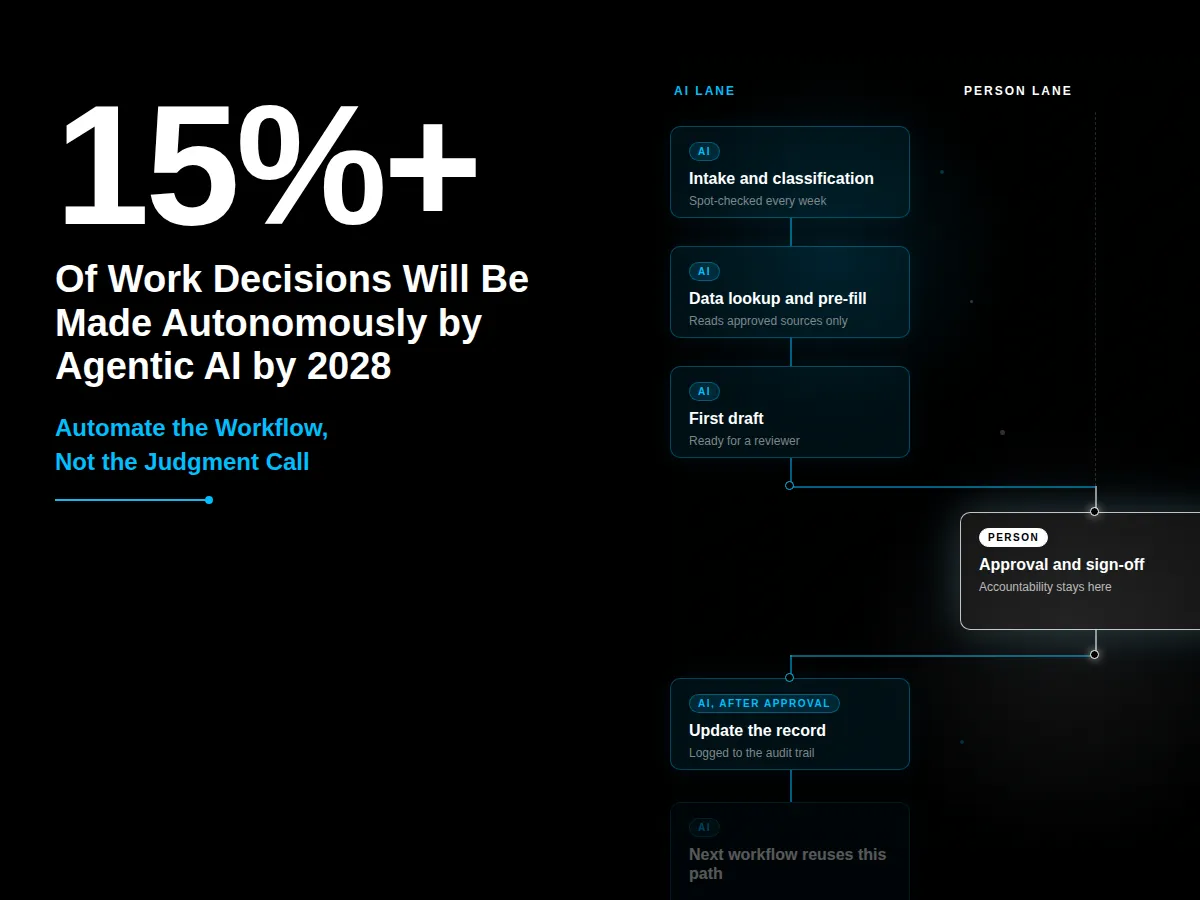
Automate the steps that follow rules and repeat at volume, such as intake and data lookup. Keep people on the steps that approve, certify, or change a regulated record.
Intake and classification: yes, with spot checks. High volume with clear categories, so a person can sample the results.
Data lookup and pre-fill: yes. The AI reads approved sources, and the source stays the record of truth.
First draft of a response or summary: yes, a person approves. The draft saves hours, but the sender owns the content.
Approval or sign-off: no. Accountability sits with a named person.
Exceptions and edge cases: route to a person. Volume is low, variation is high, and an error costs more.
Any change to a regulated record: a person approves first. The change has to hold up in an audit.
How do you decide where a human stays in the loop?
Decide by consequence and reversibility. If a wrong output is hard to undo, or if it reaches a patient or a regulator, a person approves it first. If a wrong output is cheap to fix, a person can review a sample after the fact.
Decision rights are moving to software. Gartner predicts that agentic AI will make 15% or more of day-to-day work decisions autonomously by 2028, up from none in 2024. (Gartner, June 2025) That makes the line worth drawing on purpose. It also fits McKinsey's finding that security and risk concerns are the main barrier to fully scaling agentic AI. Approval rules written up front answer those concerns, because they show a reviewer what the AI may do alone.
What should a person approve before the AI acts?
Require approval before the AI sends anything outside the company. That includes messages to patients and filings to regulators. Require approval again before any change to a regulated record.
Build the approval step so it takes seconds. Show the reviewer the AI's draft and its sources, then ask for one decision. A slow approval step pushes people to approve without reading.
What can a person review after the fact?
Low-consequence steps can run first, and a person can review them later. Sample a fixed share of outputs each week. Compare them with what a person would have done, and track the miss rate. If the miss rate rises, tighten the rules or move the step back to pre-approval.
Our post on why AI can't make the final call covers the regulatory case for this line in healthcare. Our piece on keeping humans in the control tower covers how to staff the review role.
How do you pick the first workflow to automate?
Pick one workflow that runs at volume and already has a human reviewer. That reviewer becomes your approval step on day one.
Measure the baseline before you build: how long the workflow takes end to end and how often it needs rework. A custom AI agent can take on the intake and drafting steps while the approval step stays where it is. Our post on how to deploy your first AI agent lays out a 90-day plan for that build.
What do AI integration services need to cover?
AI integration services connect the AI to the systems where work already happens. Examples include your case management tool, document store, and CRM. Start with read access, since reading carries low risk. Add write access only through the approval step.
Log every action the AI takes, along with the record it touched and the person who approved it. In a regulated workflow, that log is your audit trail. Build it into the integration from the start. Use your existing identity and permission model so the AI can't see more than the person it supports.
Where should a team start?
Pick one workflow and mark each step: automate, automate with approval, or keep with a person. A one-page version of the list above works fine. Then name the approver for every step that needs one.
If you'd like a second set of eyes on that map, CI will work through it with your team. Talk to CI about your first workflow.
Frequently asked questions
What is AI workflow automation?
AI workflow automation uses AI to run business processes that have many steps. Some of those steps read documents, sort requests, or draft replies. It handles variation in inputs that rule-based automation cannot, so the design of human review matters.
Which workflow steps should stay with a human in a regulated industry?
Approvals, sign-offs, and any change to a regulated record should stay with a named person. A person should also approve any step that sends information outside the company, such as a message to a patient, before the AI acts.
How is AI workflow automation different from RPA?
RPA follows fixed rules and fails when an input changes. AI workflow automation uses models to handle variable inputs, such as free-text requests. That adds flexibility. It also adds the risk of quiet errors, which is why regulated teams add review points.
How should a regulated team start with AI workflow automation?
Pick one workflow that runs at volume and already has a human reviewer. Record a baseline first. Then mark each step as automate, automate with approval, or keep with a person. Build the audit log before launch.
Author

Craig Taylor

Share this article


Subject Matter Expert

Craig Taylor
Practice Lead, CI Digital
Speak With Our Team
Share this article